Stop Waiting on Realms Outages: Build a Better Server With RackGenius


If you have been playing Minecraft recently, there is a good chance you have run into the worldwide Realms outage. With horrible downtime, lagging, or it's not letting people join at all. When you decide to play with friends, this information gets frustrating fast. When you finally have time to hop on, and then the server is unavailable, this is a kick in the face kind of experience.
Additionally, Minecraft Realms are limited to only 8 players at a time, including the Realm owner. So, if you have a larger friend group or even just a few friends who all want to play together, you are already running into limits before you even start building anything. That is where hosting your own server through RackGenius really changes the game.
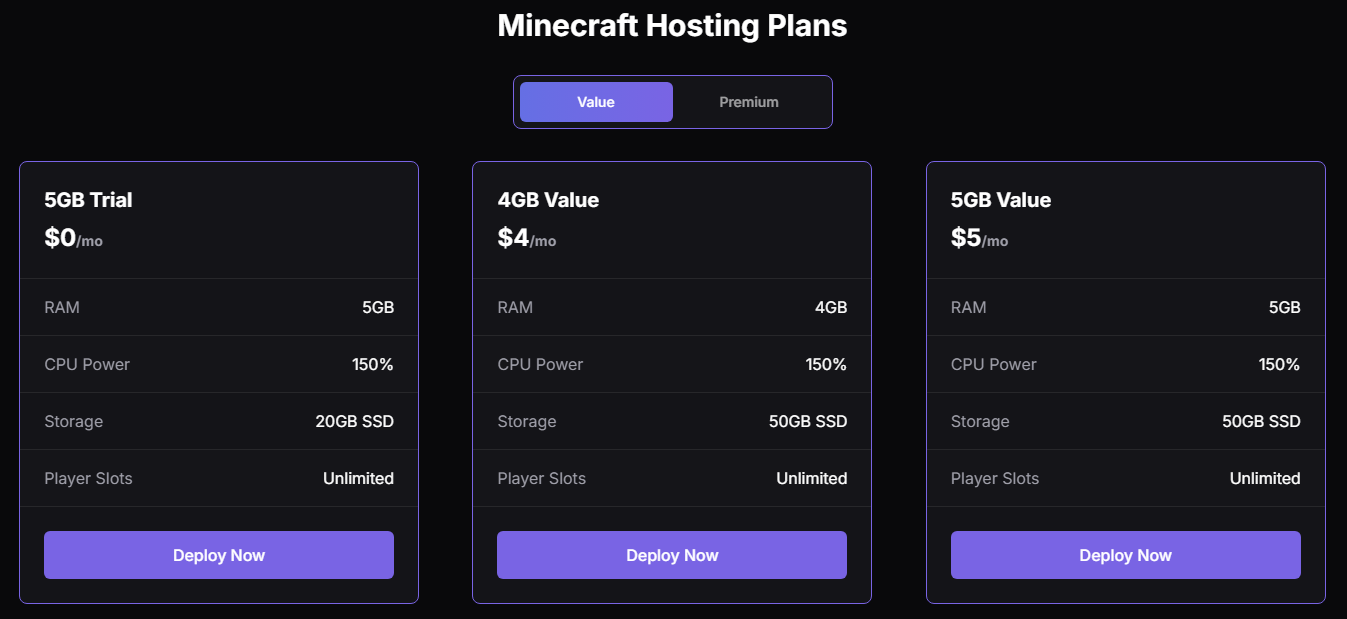
With RackGenius Minecraft hosting, you are not stuck with strict player limits or locked-down settings. Instead, you get full control over your server. You choose how much RAM you want, and pricing is simple at just $1 per gigabyte. If your world grows and you need more power, you can scale up instead of being forced into a single fixed plan.
When you are running on dedicated Minecraft server hosting instead of a shared Realm system, you also get better reliability and performance. You are not waiting on a massive global network to come back online. Your server is yours, and it stays online when you need it.
Another big win is customization. With Realms, what you see is mostly what you get. With RackGenius, you can install plugins, data packs, custom worlds, minigames, economy systems, and pretty much anything you can think of.
Whether you want survival with quality of life upgrades, a modded-style experience using plugins, or a server built around events and mini games, you are not boxed in by preset options.
Additionally, one of the coolest features is that you can even play together across different platforms.
Playing Together With Both Java and Bedrock Using Geyser and Floodgate
Normally, players of Java Edition and Bedrock Edition cannot join the same server. That is a huge downside when some of your friends are on PC, and others are on console, mobile, or tablets. With RackGenius hosting, you can fix that using two plugins called Geyser and Floodgate.
Geyser allows Bedrock players to connect to a Java server. Floodgate lets those Bedrock players join without needing a Java account. Together, they make true cross-play possible. Here is a simple breakdown of how it works and how to set it up.
Step 1: Use a Paper or Spigot Server
First, make sure your server is running Paper or Spigot. Paper is usually recommended because it is faster and more optimized.
On RackGenius, you can choose Paper when setting up your server or switch to it later if needed.
Step 2: Download Geyser and Floodgate
You will need two plugin files:
- Geyser-Spigot (or Geyser-Paper)
- Floodgate-Spigot (or Floodgate-Paper)
Upload both plugin .jar files to your server’s plugins folder using the file manager or SFTP.
Then restart your server so the plugins can generate their config files.
Step 3: Configure Floodgate
Floodgate usually works right out of the box, but it is important that:
- Floodgate is installed on the Java server (not proxy unless you are using Bungee or Velocity).
- Geyser detects Floodgate automatically after a restart.
Floodgate handles authentication, so Bedrock players do not need Java accounts, which makes it super easy for console and mobile friends to join.
Step 4: Check the Geyser Port
By default, Geyser opens a Bedrock port, usually 19132.
In the Geyser config file:plugins/Geyser-Spigot/config.yml
You can confirm or change:
- Bedrock port
- Server address
- Auth type (should be floodgate if Floodgate is installed)
Make sure that the port is open in your RackGenius server panel so Bedrock players can actually connect.
Step 5: How Players Join
Java players:
- Join normally using your server IP.
Bedrock players:
- Add a new server in the Friends tab.
- Enter the same IP.
- Use the Bedrock port (like 19132).
Once connected, everyone plays together on the same world, builds together, explores together, and just has more fun because nobody is left out.
It is honestly one of the best upgrades you can make to a server if your friend group is split between devices.
Why It's Better When Everyone Can Play Together
Gaming is always better when you do not have to tell someone they cannot join because of platform or player limits. With RackGenius, you are not worrying about Realms outages, tight player limits, or being stuck with default settings.
You get dependable hosting, full customization, and the freedom to build the kind of Minecraft experience you actually want. With plugins, events, custom worlds, and even bringing your Bedrock friends into your Java server using Geyser and Floodgate.
Instead of working around restrictions, you are finally in control of your server.
That is what makes RackGenius hosting a better long-term solution than Realms, especially if you are serious about playing together and building something that lasts.